Hook
Here is the boring step every 3D and concept artist does ten times a day: generate an image, then cut out the background. Qwen-Image-2.1 deletes that step. It is an open 7B image model that writes a real alpha channel itself — a transparent PNG straight out of the prompt. And an 8-step “Turbo” checkpoint, out in October, makes it fast.
The Story
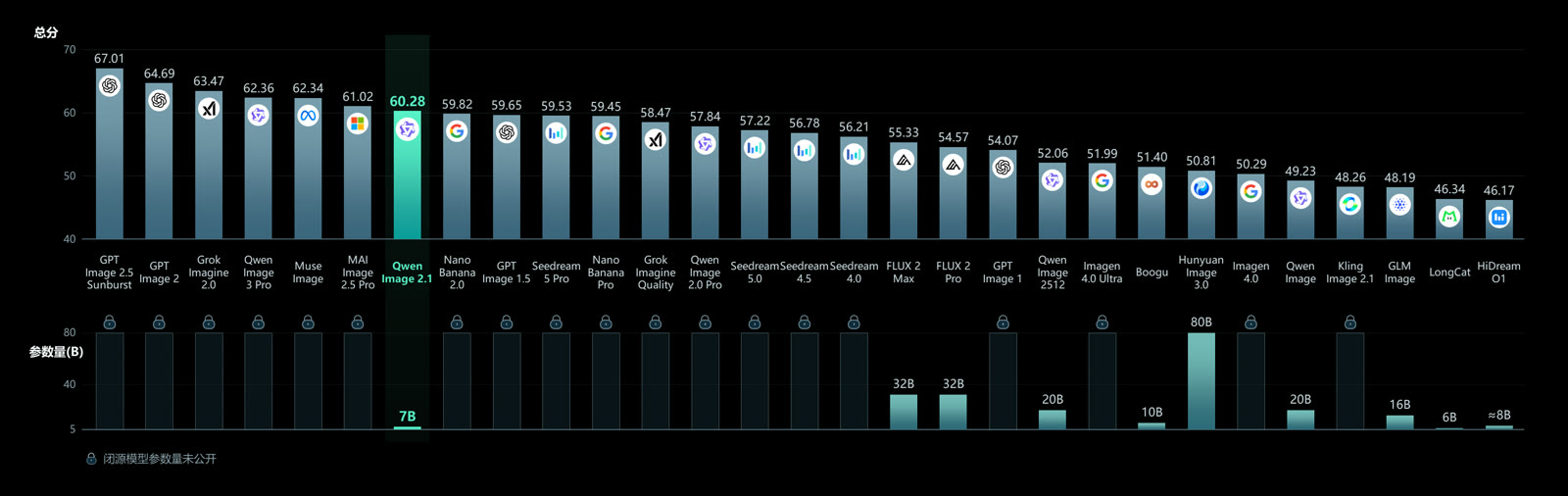
Alibaba’s Qwen team open-weighted Qwen-Image-2.1 on 20 September 2026. The model card describes a 7B visual generation core with 32 single-stream DiT layers. It handles two jobs in one model: making images from text, and editing images you give it.
The headline feature for anyone who builds assets is native transparency. The card puts it plainly: it can “Generate regular or transparent (RGBA) images from text.” It is not a matting trick bolted on afterward — the model outputs the alpha channel directly, with a recommended prompt phrasing to switch it on. It can also pull a subject straight out of a photo as a clean cutout.

On the editing side, the card lists support for up to 10 reference images, with identity preservation for people and products. So you can feed it several portraits and ask for one group shot, or keep a product consistent across a set of frames. Output resolution goes up to 2048×2048, with wide and tall options like 2752×1536.
Then came the October follow-up. A separate checkpoint, Qwen-Image-2.1-Turbo, runs the same 7B model in just 8 denoising steps — the model card calls it an “accelerated checkpoint of Qwen-Image-2.1.” Fewer steps means faster iteration, which is what you want when you are testing twenty cutout variations, not one.
Why You Should Care
Transparent output is not a gimmick for an asset pipeline. Think about what you actually need as PNGs with alpha: game sprites, UI icons, decals and texture overlays, sticker packs, concept cutouts to drop over a 3D render. The usual route is generate, then run a background remover (rembg, SAM) and hope the edges around hair and glass survive. A model that owns the alpha channel skips that whole failure point.
It also lands where you work. ComfyUI added support on day one through a pull request (Comfy-Org/ComfyUI #16400); the official templates need ComfyUI 0.37.0 or newer. So this is a node in your graph, not a web app you paste into.
The Catch: License
Read this before you build a business on it. The model card states the weights are “licensed under the Qwen Research License Agreement.” That is a research license. Commercial use requires a separate agreement with Qwen. This is a real change from the earlier Qwen-Image, which shipped under Apache-2.0. So: great for experiments, prototypes, learning and personal work — but a client deliverable needs the paperwork first.
Try It / Follow Them
- Base model: huggingface.co/Qwen/Qwen-Image-2.1
- Fast 8-step checkpoint: huggingface.co/Qwen/Qwen-Image-2.1-Turbo
- ComfyUI setup guide: comfyui-wiki.com (needs ComfyUI 0.37.0+)
IK3D Lab Take
Honest first: the Lab has not run a full benchmark of Qwen-Image-2.1 against FLUX or the earlier Qwen-Image. Everything above comes from the official model cards and the ComfyUI integration notes, not from our own render tests.
With that said, native alpha is the feature we would actually use. For asset artists it quietly removes a whole step — the generate-then-matte dance that eats time and mangles edges. If you prototype game art, UI, or concept cutouts, the 8-step Turbo in ComfyUI is worth an afternoon. Where it will bite you is the license: research-only means no commercial deliverable without an agreement, so do not wire it into a paid pipeline on a handshake. And transparency aside, a 7B model is not magic — busy scenes and tricky hands still need cleanup. Use it for what it is best at: one clean subject, on nothing, fast.
How this article was made: researched and drafted with AI assistance, then fact-checked against the original sources and reviewed by Issa before publication.